Live site: gaming.tyvan.dev
Why I Built This
I read gaming news more often than I should probably admit in a professional setting.
The problem is not that there is no gaming news. The problem is the opposite. There is too much of it, scattered across different publishers, feeds, launchers, communities, and whatever tab I opened three days ago and now refuse to close because “I might need it later”.
So I wanted a small web app with one job:
- show latest gaming articles
- keep them easy to scan
- preserve the original publisher links
- avoid turning the homepage into a casino lobby with CSS
That became Gaming Feed, a simple Next.js app backed by an existing PostgreSQL table of RSS-style articles.
The Shape of the App
The app is intentionally narrow. It is not trying to be a social network, recommendation engine, or “AI-powered engagement platform”, which is usually a normal app wearing a very expensive hat.
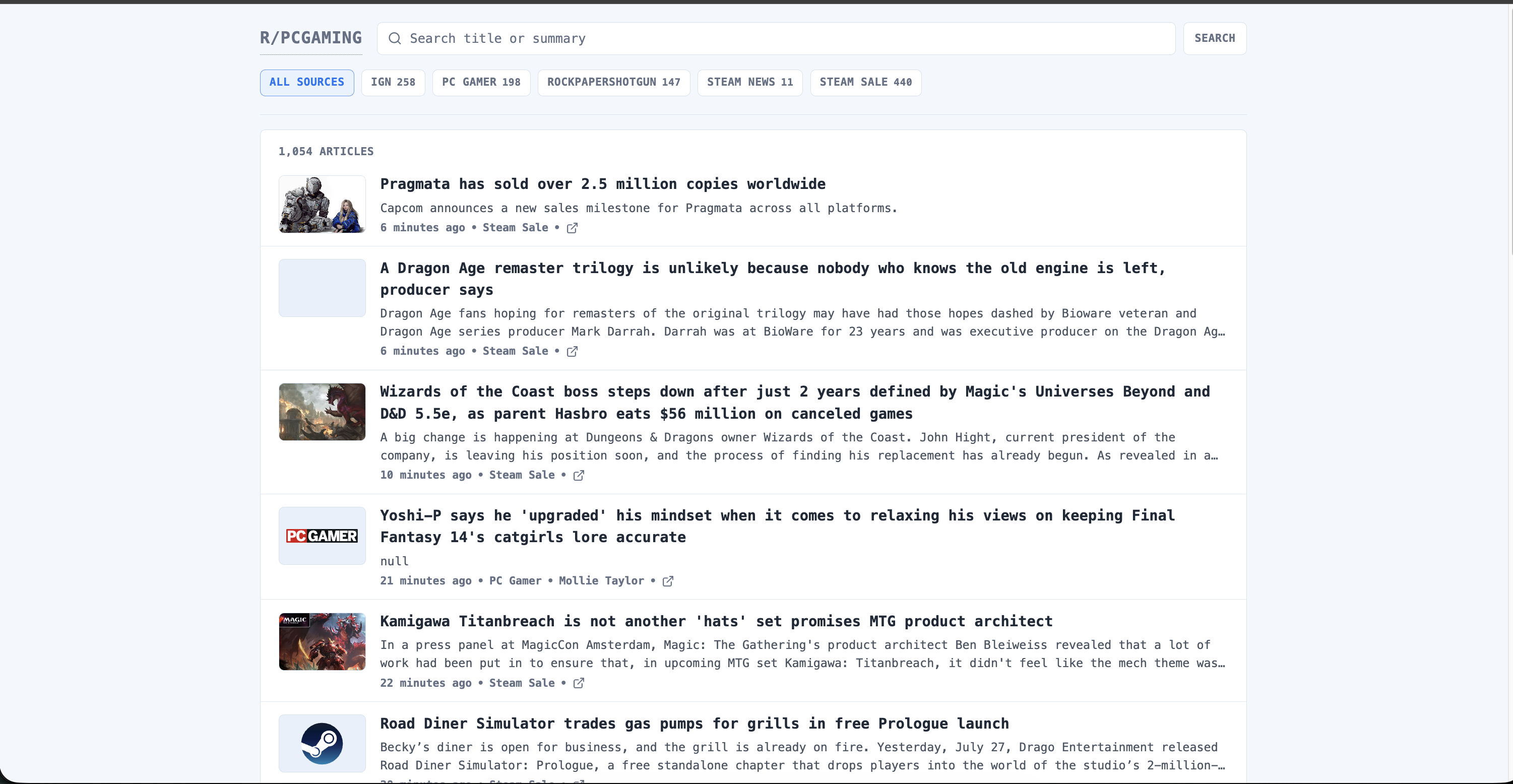
The main page shows a readable feed with:
- article titles
- summaries
- sources
- authors
- published dates
- cover images
- source filters
- search
- pagination
Each article opens the original URL in a new browser tab. I do not want to trap the reader inside my app. The publishers did the reporting, so the app should point people back to them.
The Bigger System
The web app is only the reading side of the project.
The full setup separates article collection from article presentation:
Kubernetes CronJob
  -> scheduler publishes crawl jobs
  -> Redis Stream stores pending work
  -> consumer reads through a consumer group
  -> consumer fetches RSS/Atom feeds
  -> consumer normalizes and deduplicates articles
  -> PostgreSQL stores article records
  -> Gaming Feed reads PostgreSQL
  -> I pretend this is productivity
This split keeps the web request path boring in the best possible way. Opening the homepage does not trigger RSS fetching, XML parsing, or any surprise network adventure.
The page just reads saved articles from PostgreSQL and renders them. The background pipeline does the crawling work separately.
Scheduler
The feed stays fresh through a Kubernetes CronJob.
The scheduler has a small job:
- load configured sources
- check Redis and PostgreSQL connectivity
- decide which sources are due
- publish crawl jobs to Redis
- exit
It does not fetch RSS feeds directly. That is important because the scheduler should stay short-lived and predictable. It wakes up, creates work, and leaves before anyone asks it to become a tiny distributed system in a trench coat.
To avoid crawling every source at the exact same minute, each source gets a deterministic offset inside its polling interval. Conceptually, the source ID is hashed into a minute slot.
That spreads work across time instead of creating a beautiful traffic spike every few minutes, which is the kind of beauty only monitoring dashboards enjoy.
On Kubernetes, the scheduler is kept bounded with practical controls:
- overlapping runs are forbidden
- failed runs have limited retries
- old job history is retained only briefly
- completed jobs are cleaned up automatically
- application-level timeouts limit stuck connections
Redis and the Consumer
Redis Streams connects the scheduler to the RSS consumer.
The scheduler publishes crawl jobs into a stream. The consumer reads them through a Redis consumer group. That means the consumer does not need to be online at the exact millisecond a job is scheduled. Redis keeps the pending work around until it is processed.
The consumer runs continuously as a Kubernetes Deployment. It can share the same image as the scheduler, with runtime mode deciding whether the process schedules jobs or consumes them.
For each crawl job, the consumer:
- decodes the JSON payload
- validates the job type
- builds an HTTP request with source-specific headers
- applies request timeouts and response-size limits
- rejects unsuccessful HTTP responses
- parses RSS or Atom XML
- normalizes article fields
- upserts article records into PostgreSQL
The consumer processes messages conservatively, one at a time. That keeps memory use predictable and makes transaction handling easier to reason about.
Consumer identities come from runtime environment metadata, so extra replicas can be distinguished later if I scale the deployment. Future me appreciates breadcrumbs, even when present me leaves them mostly by accident.
Article Normalization
RSS and Atom feeds are useful, but they are not exactly famous for agreeing on everything.
So the consumer normalizes publisher differences before storing records.
Article identity comes from the most stable field available:
- RSS GUID
- Atom ID
- article URL
Articles without both a usable identifier and a usable URL are skipped. A feed item with no link is not an article, it is a philosophical exercise.
For metadata, the consumer handles common author fields, recognizes standard timestamp formats, and stores parsed times in UTC.
For text and images, it:
- uses description content first
- falls back to content fields
- extracts the first HTML image URL when present
- stores that image separately as
img_url - removes image tags from the saved summary
PostgreSQL stores articles with a composite primary key based on source ID and external article ID. That gives source-aware deduplication, because two publishers can technically use the same ID for unrelated things.
Writes are idempotent. The consumer uses an upsert pattern, so repeated processing refreshes existing rows instead of creating duplicates.
All articles from one feed are saved inside a single database transaction. The Redis message is acknowledged only after PostgreSQL commits. That gives the pipeline at-least-once delivery with idempotent writes, which is a fancy way of saying: if something retries, the database should not start cloning headlines like a side quest gone wrong.
Data Model
The app expects RSS-style article records.
The useful fields are:
- source identifier
- external article identifier
- title
- original URL
- summary
- author
- image URL
- publication time
- fetch time
The app maps the database column img_url to imageUrl in the UI layer.
Querying Articles
The article query layer handles the feed behavior:
- default page size of 20
- maximum page size of 50
- source filtering
- search across title and summary
- stable ordering by publish time, then fetch time
- total count for pagination
The ordering is:
published_at DESC NULLS LAST, fetched_at DESC
This keeps newer articles first, while still giving articles without a publish date a reasonable place in the list.
Search currently uses ILIKE. It is simple, readable, and good enough for the current article volume.
If the database grows into a ridiculous pile of gaming headlines, I would probably move this to PostgreSQL full-text search or trigram indexes. For now, ILIKE does the job without asking me to open a second browser tab and question my life choices.
UI Design
I wanted the interface to feel like a compact feed, not a landing page trying to sell me my own keyboard.
The main screen has:
- a branded
R/PCGAMINGheader link - a search form
- source filter chips with article counts
- article cards with thumbnails
- cleaned summaries
- source labels
- author and date metadata
- newer/older pagination controls
- empty and loading states
- a database error state
The article cards are the important part. They need to be easy to scan on desktop and still usable on mobile.
Images use the article image when available. If an article does not have one, the app falls back to recognizable source images for known sources like IGN, PC Gamer, and Steam.
RSS summaries can sometimes arrive with HTML fragments, entities, and other tiny bits of content confetti. The app cleans those summaries before rendering them so the feed does not look like someone sneezed into an XML parser.
Database Configuration
Database access is centralized in lib/db.ts.
The app reads DATABASE_URL from the environment and supports a few practical PostgreSQL connection options:
schema, mapped to the PostgreSQL search pathsslmode, used to disable SSL when neededsslaccept=accept_invalid_certs, used for trusted environments with invalid certs
There is also a small database check script:
npm run db:check
It loads .env if present, connects to PostgreSQL, applies the same schema and SSL handling as the app, and prints basic database context plus the article count.
This is one of those scripts that looks small until the day something breaks. Then it becomes a tiny flashlight in the cave.
Kubernetes
The deployment manifests include:
- namespace
- deployment
- service
- ingress
- secret-based
DATABASE_URL - readiness probe
- liveness probe
- basic CPU and memory requests/limits
The app is stateless, so it does not need a PersistentVolume. The only persistent part is PostgreSQL, which lives outside this app.
The web traffic follows the usual path in my cluster:
Browser
  -> Cloudflare
  -> Traefik
  -> Gaming Feed service
  -> Next.js pod
  -> PostgreSQL
The public app URL is:
https://gaming.tyvan.dev
The ingestion side runs as separate scheduler and consumer workloads. Those workloads use small resource requests and limits, restricted container security settings, and credentials from Kubernetes Secrets.
One temporary workaround was needed while cluster service networking was unreliable. Some workloads bypassed the broken service virtual-IP path while still using service hostnames for TLS verification.
That is infrastructure glue, not app design. Once service networking behaves again, it should go away. I am writing this here so future me cannot pretend it was “architecture”.